
Stop YOUR emails from starting those company-wide Reply All email threads
You know you’ve seen it before; somebody sends out a company-wide email (or email to a large audience), and a small group of people start Reply-All-ing back to the email with info or jokes that is only relative to that small group of people, yet EVERYBODY on the original email list has to suffer their inbox filling up with what is essentially spam since it doesn’t pertain to them.
A co-worker of mine made an ingenious off-hand comment to me one day of how to avoid this, and I’ve been using it ever since.
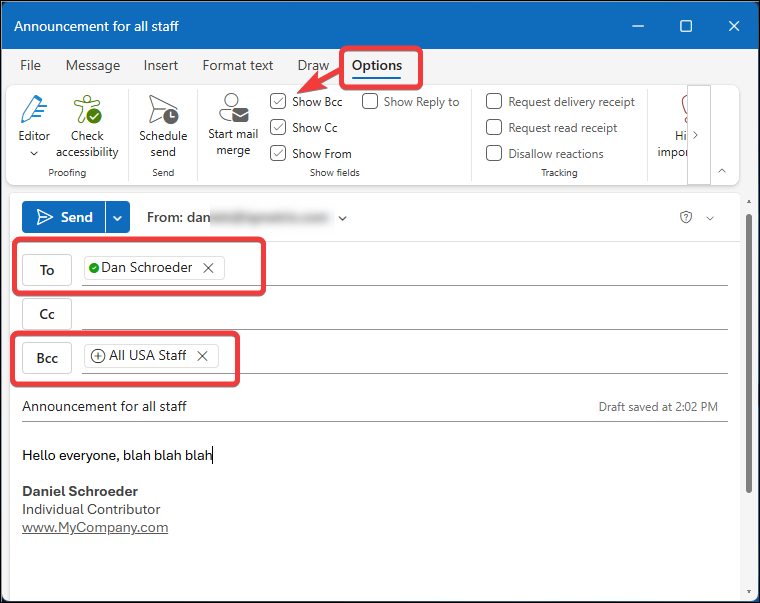
Simply place the email addresses of everybody that you are sending the email to in the BCC field (not the CC field), and in the TO field put your email address.
So everybody still gets the email, and if anyone does a Reply or Reply All back, only you are notified.
You can then determine if a followup email to the entire group is warranted.
Note that the email recipients will not be able to see who else the email was sent it to, so you may want to include that info in the email subject or body.
Obviously, you will not want to use this all the time; there are some times when you want a group discussion to occur over email. But for those other times you can use this trick, such as when sending a NWR (Non-Work Related) email about the car you are selling, asking everyone what a good local restaurant near by is, collecting personal info from people, or sharing a handy program or trick you learnt about (such as this one 😉). This trick can save everybody frustration and avoid wasting their time. Trust me, your coworkers will thank you; mine did 😊
Leave a Comment
Your email address will not be published. Required fields are marked *