
Host website PR previews on GitHub Pages for free
GitHub Pages allows you to host one static website per repository for free.
The URL is typically in the format https://<username>.github.io/<repository>/, and you can use it to host your project’s documentation, portfolio, or any static content.
I use it to host this blog for free, along with a custom domain name.
The problem; hosting PR previews
Recently, I wanted to preview some changes I was making to my blog before merging them into the main branch. I can run the site locally on my PC, but wanted to preview it from my phone, and share the link with my wife to get her feedback.
Since GitHub Pages only gives you one URL per repo, the typical advice is to use a 3rd party hosting service like Netlify, Vercel, AWS, or Azure to host PR preview sites. You can use a GitHub Actions workflow to deploy the preview version of your site to the external service when a PR is opened, and it will get a unique URL that you can share with others. GitHub even has official documentation on how to deploy PRs to services like Azure Static Web Apps.
Even though some of these services have free tiers, I didn’t want to sign up for another hosting platform, deal with API keys, or depend on a 3rd party service just for PR previews. I wanted everything to remain in GitHub.
There are long-standing issues asking GitHub to allow hosting PR previews directly on GitHub Pages, such as this one. Unfortunately, it doesn’t look like it will be implemented anytime soon. Luckily, I found a workaround.
A simple solution
Rather than hosting multiple static websites on different subdomains, simply host them all on the same domain, but in different subdirectories. Essentially, your PR previews can be hosted inside your production website, just in a deeper path.
So to visit your production site you would go to https://<username>.github.io/<repository>/, and to visit your PR preview site you might go to https://<username>.github.io/<repository>/previews/pr-123/, where 123 is the PR number.
Caveats
There are some caveats with this approach:
- For non-generated sites, assets must be referenced with relative paths so they work in both the production and preview sites.
- I use Jekyll as my static site generator and simply set the
baseurlin the config when building the site. All asset references are relative to the base URL.
- I use Jekyll as my static site generator and simply set the
- The PR preview site is publicly accessible by default, which may not be desirable, especially for closed-source projects where you don’t want to expose unfinished work.
- To prevent web crawlers from indexing the PR previews, you should update your
robots.txtfile to disallow crawling of the previews subdirectory. - Your production site analytics may be skewed by traffic to the PR previews.
Since my use case is simply my public open-source blog, these caveats are not a concern for me.
An example workflow
The basic workflow is as follows:
- When a PR is opened, deploy the preview version of the site to a subdirectory named after the PR number, and post a comment in the PR with the URL to the preview site.
- If the PR is updated, redeploy the preview site with the latest changes.
- When the PR is closed, delete the preview site.
Here’s an example PR comment with the preview URL that can get posted by the workflow:
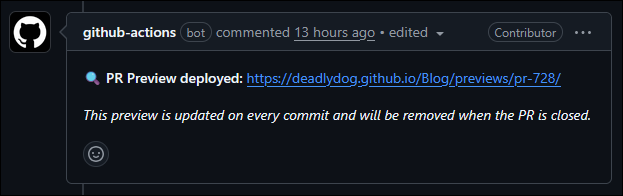
Let’s see how to configure the GitHub repo and set up GitHub Actions workflows to take care of this for us. The examples shown are from my blog GitHub repo, for reference: https://github.com/deadlydog/Blog
Configuring the GitHub repo
You will need to configure your GitHub repo settings to enable GitHub Pages and to deploy from a branch, typically the gh-pages branch.
In your GitHub repo settings:
- Go to the
Pagessection. - Ensure the build and deployment Source is set to
Deploy from a branch. - For the Branch, select
gh-pagesand the root folder. - Optionally, if you have a custom domain name, you can set it up here as well.
- This will require some DNS configuration to point your custom domain to GitHub Pages. I will not cover it here, as you can read the GitHub documentation on how to set that up.
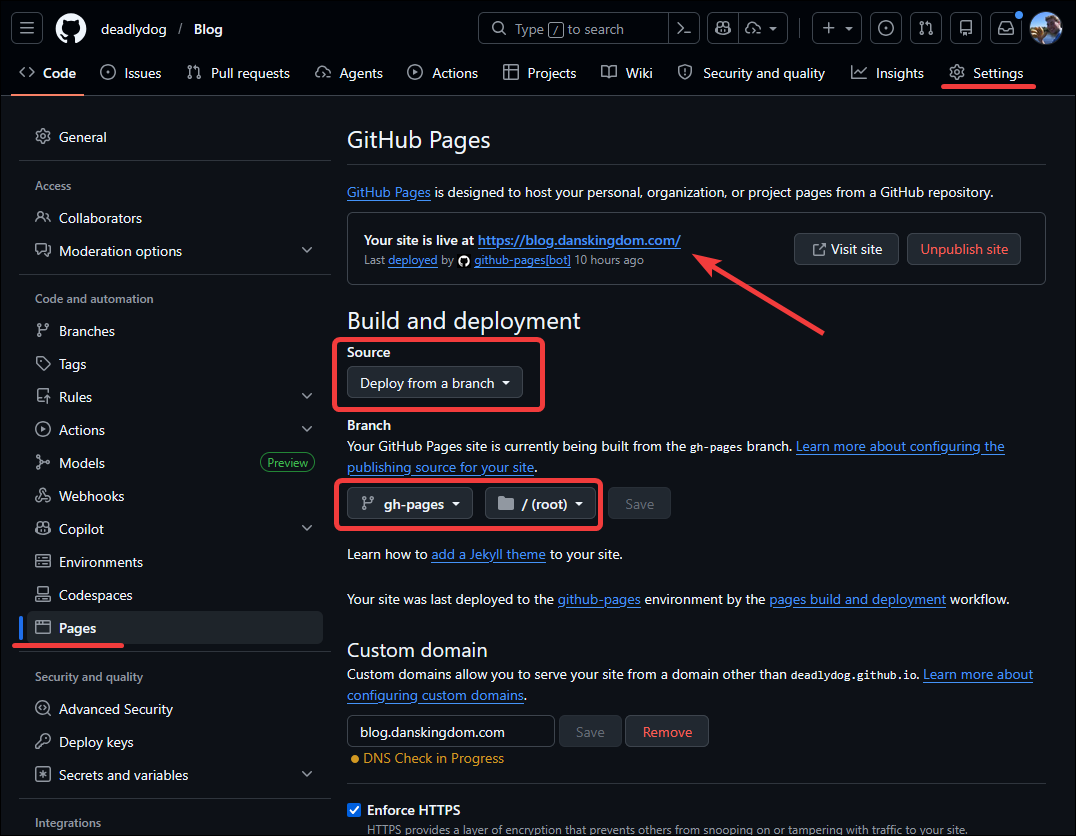
Now whenever changes are pushed to the gh-pages branch, GitHub Pages will automatically build and deploy the site, and it will be available at the URL specified in the settings.
This is how you host your production site. The next step is to have PR previews automatically deployed to subdirectories within it.
Setting up GitHub Actions workflows
You will need to set up 2 GitHub Actions workflows:
- One to deploy the PR preview site when a PR is opened or updated, and to delete it when the PR is closed.
- Another to deploy the production site to the
gh-pagesbranch when changes are merged into the main branch.
PR preview to gh-pages workflow
Below is an example workflow for deploying PR previews to a previews subdirectory within the gh-pages branch.
It also updates the PR with a comment containing the URL to the preview site.
When the PR is closed, the workflow deletes the preview site from the gh-pages branch.
You can view the latest version of this pr-preview.yml workflow here.
This workflow has some Jekyll-specific steps, but the general idea can be adapted to your needs.
# Builds and deploys the Jekyll site for PRs to the "previews" directory on the
# gh-pages branch, and posts a comment with the preview URL to the PR.
# Also removes the preview from gh-pages when the PR is closed (merged or abandoned).

name: Deploy PR preview to gh-pages

on:
  pull_request:
    types: [opened, synchronize, reopened, closed]

permissions:
  contents: write
  pull-requests: write

jobs:
  # ─── Deploy preview on PR open / update ──────────────────────────────────
  deploy-preview:
    if: github.event.action != 'closed'
    runs-on: ubuntu-latest
    concurrency:
      group: pr-preview-deploy-${{ github.event.pull_request.number }}
      cancel-in-progress: true
    steps:
      - uses: actions/checkout@v4

      - uses: ruby/setup-ruby@v1
        with:
          ruby-version: '3.3'
          bundler-cache: true

      - name: Build Jekyll preview site
        shell: pwsh
        env:
          JEKYLL_ENV: production
          JEKYLL_GITHUB_TOKEN: ${{ secrets.GITHUB_TOKEN }}
        run: |
          # Write a temporary config that overrides baseurl for the preview path.
          @"
          url: "https://blog.danskingdom.com"
          baseurl: "/previews/pr-${{ github.event.pull_request.number }}"
          "@ | Set-Content -Path /tmp/_config_preview.yml

          bundle exec jekyll build --config _config.yml,/tmp/_config_preview.yml --destination ./_site_preview

      - name: Deploy preview to gh-pages branch previews subdirectory
        uses: peaceiris/actions-gh-pages@v4
        with:
          github_token: ${{ secrets.GITHUB_TOKEN }}
          publish_dir: ./_site_preview
          destination_dir: previews/pr-${{ github.event.pull_request.number }}
          keep_files: true
          commit_message: "Deploy preview for PR #${{ github.event.pull_request.number }} (${{ github.sha }})"

      - name: Post / Update preview URL comment on PR
        uses: actions/github-script@v7
        with:
          script: |
            const prNumber = context.payload.pull_request.number;
            const previewUrl = `https://${context.repo.owner}.github.io/${context.repo.repo}/previews/pr-${prNumber}/`;
            const marker = '<!-- pr-preview-bot -->';
            const body =
              `${marker}\n` +
              `🔍 **PR Preview deployed:** ${previewUrl}\n\n` +
              `_This preview is updated on every commit and will be removed when the PR is closed._`;

            const { data: comments } = await github.rest.issues.listComments({
              owner: context.repo.owner,
              repo: context.repo.repo,
              issue_number: prNumber,
            });

            const existing = comments.find(c => c.body.includes(marker));
            if (existing) {
              await github.rest.issues.updateComment({
                owner: context.repo.owner,
                repo: context.repo.repo,
                comment_id: existing.id,
                body,
              });
            } else {
              await github.rest.issues.createComment({
                owner: context.repo.owner,
                repo: context.repo.repo,
                issue_number: prNumber,
                body,
              });
            }

  # ─── Clean up preview when PR is closed (merged or abandoned) ────────────
  cleanup-preview:
    if: github.event.action == 'closed'
    runs-on: ubuntu-latest
    concurrency:
      group: pr-preview-cleanup-${{ github.event.pull_request.number }}
      cancel-in-progress: false
    steps:
      - uses: actions/checkout@v4

      - name: Remove preview directory from gh-pages branch
        shell: pwsh
        run: |
          # Guard: if gh-pages doesn't exist yet there is nothing to clean up.
          git ls-remote --exit-code --heads origin gh-pages *> $null
          if ($LASTEXITCODE -ne 0) {
            Write-Host "gh-pages branch does not exist - nothing to clean up."
            exit 0
          }

          # Fetch and create a local tracking branch so 'git checkout' works.
          git fetch origin gh-pages:gh-pages --depth=1
          git checkout gh-pages

          $prDir = "previews/pr-${{ github.event.pull_request.number }}"
          if (Test-Path $prDir) {
            git config user.name "github-actions[bot]"
            git config user.email "github-actions[bot]@users.noreply.github.com"
            git rm -r -f $prDir
            git commit -m "Remove preview for PR #${{ github.event.pull_request.number }}"
            git push --set-upstream origin gh-pages
          }
          else {
            Write-Host "Preview directory '$prDir' not found - nothing to clean up."
            exit 0
          }
Main branch to gh-pages workflow
Below is an example workflow for deploying the production site to the gh-pages branch when changes are merged into the main branch.
A key part of the workflow is preserving the previews subdirectory on the gh-pages branch, which contains the PR previews, so that they are not wiped out when the main production site is redeployed.
You can view the latest version of this deploy-site.yml workflow here.
# Builds the Jekyll site from main and pushes it to the gh-pages branch,
# while preserving any PR preview directories that already exist there.

name: Deploy main to gh-pages

on:
  push:
    branches: [main]
  workflow_dispatch:

permissions:
  contents: write

jobs:
  deploy:
    runs-on: ubuntu-latest
    steps:
      - uses: actions/checkout@v4

      - uses: ruby/setup-ruby@v1
        with:
          ruby-version: '3.3'
          bundler-cache: true

      - name: Build Jekyll site
        shell: pwsh
        env:
          JEKYLL_ENV: production
          JEKYLL_GITHUB_TOKEN: ${{ secrets.GITHUB_TOKEN }}
        run: |
          # Override baseurl so the github-pages gem does not inject the
          # repository name (/Blog) as the baseurl, which would break asset paths.
          @"
          url: "https://blog.danskingdom.com"
          baseurl: ""
          "@ | Set-Content -Path /tmp/_config_deploy.yml

          bundle exec jekyll build --config _config.yml,/tmp/_config_deploy.yml

      # Preserve any PR preview directories that already live on gh-pages so
      # that a main-site redeploy does not wipe them out.
      - name: Restore previews directories from gh-pages branch (if present)
        shell: pwsh
        run: |
          git ls-remote --exit-code --heads origin gh-pages *> $null
          if ($LASTEXITCODE -ne 0) {
            Write-Host "gh-pages branch does not exist yet - skipping restore."
            exit 0
          }

          git fetch origin gh-pages --depth=1

          # Copy the previews tree into the freshly built _site so the
          # subsequent deploy action includes it in the push.
          git checkout origin/gh-pages -- previews/ 2>$null
          if ($LASTEXITCODE -eq 0) {
            Copy-Item -Recurse -Force previews _site/previews
            Remove-Item -Recurse -Force previews
          }
          else {
            Write-Host "No previews directory on gh-pages yet - skipping restore."
            exit 0
          }

      - name: Deploy to gh-pages branch
        uses: peaceiris/actions-gh-pages@v4
        with:
          github_token: ${{ secrets.GITHUB_TOKEN }}
          publish_dir: ./_site
          cname: blog.danskingdom.com
          commit_message: "Deploy main site from ${{ github.sha }}"
Update robots.txt to ignore preview sites
One optional, but recommended step, is to update your robots.txt file to disallow web crawlers from indexing the PR preview sites.
This will prevent the previews from showing up in search engine results, and users getting 404 errors when the previews are eventually removed after the PR is closed.
In your site’s robots.txt file, add:
# Prevent all web crawlers from indexing PR previews.
User-agent: *
Disallow: /previews/
If the file is typically generated by your static site generator, you may need to include the lines that it would typically generate, such as the link to your sitemap file. You can view my site’s robots.txt file here as an example.
Conclusion
By hosting PR previews in subdirectories on the same GitHub Pages site, you can have free and easy PR previews without needing to set up an external hosting service.
I’ve shown how to configure your GitHub repo, and provided example GitHub Actions workflows to automate the deployment of PR previews and the main site.
I hope you found this helpful, and that it inspires you to set up PR previews for your own GitHub Pages sites!
Happy coding!
Leave a Comment
Your email address will not be published. Required fields are marked *